
AMihkal: Apple Mice I Have Known and Loved (And One That I Detest)
Published: Tuesday, 5th November 2019

I’ve been a Mac user since 2007, when I went to uni to study photography and bought a MacBook because I figured that I might as well get to grips with the industry standard computer platform sooner rather than later. It was an instant revelation, I simply couldn’t comprehend how much better a user-experience Mac OS was than Windows. I was an instant convert and have never looked back.
Using my Apple laptop for work and pleasure was one thing but using the fully-expanded and souped-up Mac Pro towers in the university’s digital lab was quite another! Not only had they the brilliant user-experience I was getting on my MacBook but they also had terrific power, making light work of even the heaviest photo processing I could throw at them. Staggering stuff. But I remember that the thing I was most enamoured with was the weird little white control device that served to connect human input to computer output; the Apple Mighty Mouse.

All it did was point, click, and scroll. And, incredibly, that scant specification was absolutely ample for my demands and I soon was able to fly around Photoshop churning out retouched images. It wasn’t until some time later that I relaised that the Mighty Mouse did, in fact, have more buttons and functionality but that someone had disabled everything other than point, click, and scroll on the uni Macs. In my opinion, whoever had done that was a man of taste and wisdom as, no matter how hard I’ve tried over the years, I’ve never managed to really get the hang of Apple mice having all the extra functions and buttons enabled. It just doesn’t work anywhere near as nice as when they’re disabled and the user relies on using the keyboard in conjunction with the mouse. I know I’m in good company here, as Steve Jobs himself was notoriously angsty about mouse functionality.
The Mighty Mouse was my introduction to the world of Apple mice but as I started to collect old Macs I was exposed to what had come before. The first retro Macintosh I acquired was a Performa 630, and that came with the classic 90s-era Apple ADB Mouse II.

This teardrop-shaped mouse has a nice ergonomic design, fitting snugly in the hand. With a single button, of course, straddling the top of the mouse the user’s hand can restfully encompass the whole mouse and still be able to correctly press the button without having to shift to choose left or right. With the user’s non-mouse hand poised at the keyboard ready to trigger contextual menu clicks and other actions (ideally on a lovely Apple Extended Keyboard II). As long as the mouse ball and its mechanism is clean, and the user has a good quality mouse mat underneath ot providing high friction, the Apple ADB Mouse II is a joy to use. Silk beneath the fingers! As with all ball-driven mice, a build-up of dust and gunge is inevitable but easily resolved with a moist cotton bud. A peach of a mouse and still my preferred vintage Apple control device.
I was collecting vintage Macs for quite some time before I came across the precursor to the ADB Mouse II; the Apple ADB Mouse.

As you can see, it has a much blockier design more in-line with the first Macintosh Mouse. The single button is inset to the case rather than spanning the whole width of the top, which does make it a little more awkward to use, the user’s hand needs to be positioned so that a finger or two sits above that small rectangle of space. The ridged design of the palm-rest is also sub-optimal, in my opinion, but maybe I was just spoiled by being so accustomed to the sleek design of the ADB Mouse II and the Mighty Mouse. This mouse is a product of its time, most computer devices of the mid/late 80s to early 90s were square-cornered lumps of plastic. Certainly, it’s very similar in look and feel to the standard mouse supplied with the Commodore Amiga. As an Amiga owner in my youth, I can tell you that that is a Bad Thing… Whenever I’ve since acquired an old Mac that has one of these, I put it to one side and use a ADB Mouse II instead.
Into the modern Apple era of Steve Jobs and Jony Ive, inudstrial design went mental and gave us the Marmite of mouses; the Apple USB Mouse (aka The Puck).

I’ve written before about how much I actually enjoy using this mouse, so I won’t retread all that. I will, however, restate that this mouse is an essential step toward Apple absolutely nailing mouse design with the Mighty Mouse. Without the harsh criticism they received for this quirky device they might never have been driven onwards to perfection, the next step of which in that journey was the Apple Pro Mouse.
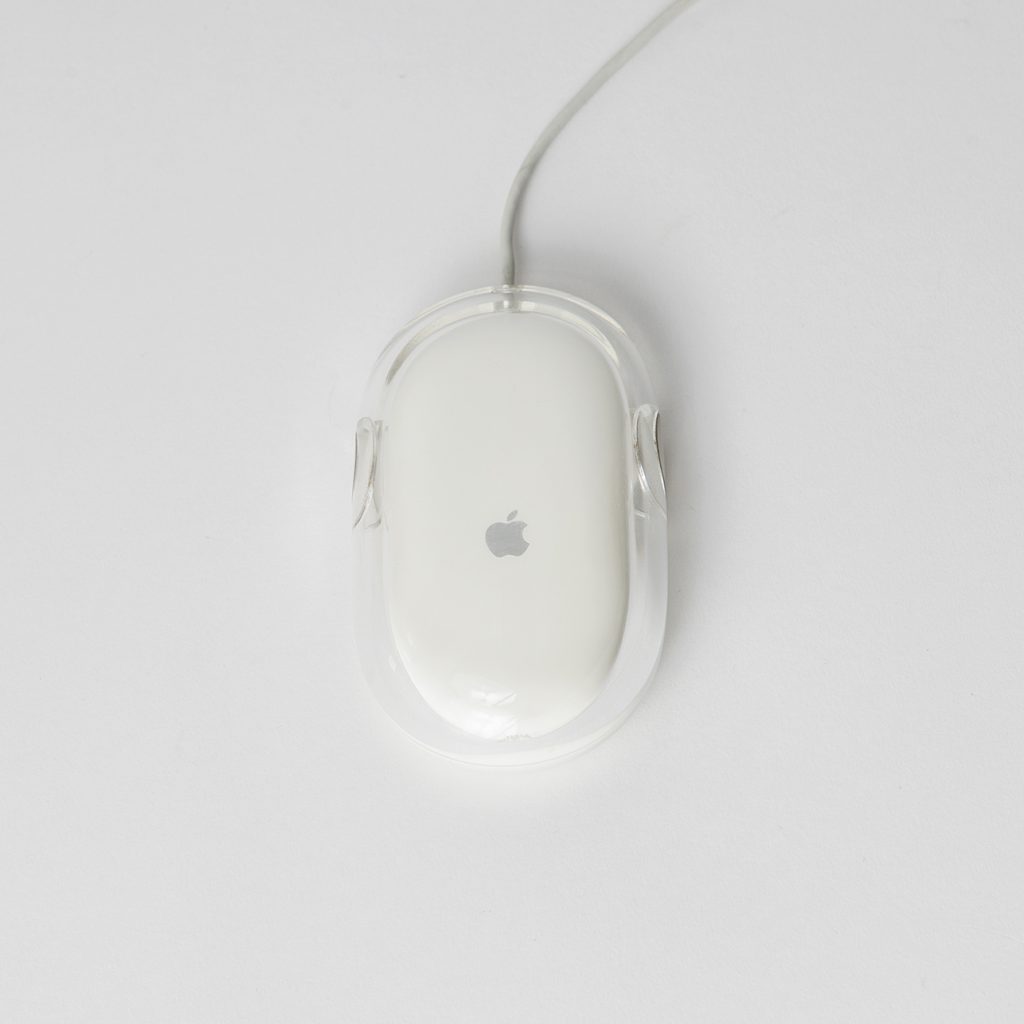
Referred to as the first “zero-button” mouse, the pro Mouse has a translucent shell in an elongated and introduces the action of the whole top of the mouse being the button. This is a win for ease of use and comfort. Using a laser beam instead of a ball, this was one of the first optical mice shipped as standard with computers. Whilst a great mouse for its time, it certainly does miss scroll functionality which is the reason that I almost always put these to one side when sorting through newly-acquired Macs in favour of the Mighty Mouse and its neat little scroll ball (which does get filled with gunge quite quickly, sure, but that’s easily cleaned by rubbing the thing on a sheet of paper…). Both the Pro Mouse and Mighty Mouse were released in wireless Bluetooth versions but i’ve always preferred the wired versions as there’s nothing more irritating than dead batteries in the middle of a retouching job.
Speaking of wireless mouses, onto the one Apple mouse that I truly detest; the Apple Magic Mouse.

I rue the day that I wasted good money on this monstrosity. First of all, it adopts sharp, contoured edges rather than the previous bubble-like form and this absolutely destroys the ergonomic function of the mouse. Within minutes of use, my fingers start to feel aggravated from rubbing on the outside lines of the device. It’s also cursed with multi-touch gesturing, which happily can be disabled in system preferences *except for* sideways scrolling! Actually, that’s not 100% true as I did read that there’s a 3rd party control panel that can do it, and there’s a Terminal command that also shuts it off, but I didn’t learn those until long after I’d slung the Magic Mouse in a box, bitterly frustrated at my web browser seemingly vibrate as the damned thing tried to sideways scroll all the time. Infuriating! What’s also infuriating is that the charging port for the mouse in located on the base, which means you can’t connect it to the Mac and charge whilst you use, which is absolutely bonkers! This mouse is a fail.
So, in my opinion, the apotheosis of Apple mouse design was the wired Mighty Mouse. I’m using one right now on my Mac Mini, and have another hooked into my Mac Pro production workstation. The scroll ball getting blocked up with dirt once every few weeks is a very minor complaint compared to the overall delight in using this fine mouse, and I recommend it to all! Get on eBay and stock up.

Thanks for reading, please follow me on Twitter to keep abreast of all my latest Macintosh discoveries. And please do consider supporting my work via Paypal or via Patreon. Every penny donated goes towards keeping this VintageAppleMac.com show on the road!


Leave a Reply